- Posts: 1810
- Thank you received: 98
Site Upgrades Starting 1/26
- HappyCamper
-

- Mountain Legend
-

Less
More
27 Jan 2016 10:36 #11
by HappyCamper
Replied by HappyCamper on topic Site Upgrades Starting 1/26
When you get the traffic cam's up can we have a tab for that rather than just the drop down menu?
Please Log in or Create an account to join the conversation.
- HappyCamper
-
- Mountain Legend
-
Less
More
- Posts: 1810
- Thank you received: 98
27 Jan 2016 17:00 #12
by HappyCamper
Replied by HappyCamper on topic Site Upgrades Starting 1/26
Ok, I am phone challenged I tried to add a photo just to test so I knew how to do it from my phone.
I clicked add file, took a picture, it came up with the little brackets with my picture .jpg and I insert that in the message with some text then hit submit and well nothing happened. I did not get an error message or anything it just sits there.
When you get done with all the upgrade stuff if you could let me know what I am doing wrong that would be great.
I clicked add file, took a picture, it came up with the little brackets with my picture .jpg and I insert that in the message with some text then hit submit and well nothing happened. I did not get an error message or anything it just sits there.
When you get done with all the upgrade stuff if you could let me know what I am doing wrong that would be great.
Please Log in or Create an account to join the conversation.
- Rick
-

- Mountain Legend
-
Less
More
- Posts: 15708
- Thank you received: 165
28 Jan 2016 09:23 #13
by Rick
The left is angry because they are now being judged by the content of their character and not by the color of their skin.
Replied by Rick on topic Site Upgrades Starting 1/26
So now we can just post a pic like we're sending a text? That would be cool if so.
The left is angry because they are now being judged by the content of their character and not by the color of their skin.
Please Log in or Create an account to join the conversation.
- ScienceChic
-
 Topic Author
- Mountain Champion
-

Less
More
- Posts: 15753
- Thank you received: 320
28 Jan 2016 11:39 #14
by ScienceChic
"Now, more than ever, the illusions of division threaten our very existence. We all know the truth: more connects us than separates us. But in times of crisis the wise build bridges, while the foolish build barriers. We must find a way to look after one another as if we were one single tribe.” -King T'Challa, Black Panther
The truth is incontrovertible. Malice may attack it. ignorance may deride it, but in the end, there it is. ~Winston Churchill
Replied by ScienceChic on topic Site Upgrades Starting 1/26
Actually you always could! There's a tutorial on it in our FAQ forum here:
mymountaintown.com/forum/my-mountain-tow...ost-a-picture#331318
HappyCamper to [sort of] answer your question, what do you mean by a "Tab" or where are you thinking a tab would be located? I ask because we'll still have the buttons on the Home Page (as far as I know at the moment) for which the Weather & Traffic button links straight to the Hwy 285 webcams, but the menu bar at the top is as full as we can have it so it will fit on mobile devices, thus the webcam pages have to exist as a drop-down under that. What we will be doing in the future is building out the "Side Bar" on the left (click the 3 bars at the top left and you'll see the forum move to the right and an empty box pop out - that's where we plan to put more info like webcams). Does that answer your question or were you thinking of something else?!
HappyCamper to [sort of] answer your question, what do you mean by a "Tab" or where are you thinking a tab would be located? I ask because we'll still have the buttons on the Home Page (as far as I know at the moment) for which the Weather & Traffic button links straight to the Hwy 285 webcams, but the menu bar at the top is as full as we can have it so it will fit on mobile devices, thus the webcam pages have to exist as a drop-down under that. What we will be doing in the future is building out the "Side Bar" on the left (click the 3 bars at the top left and you'll see the forum move to the right and an empty box pop out - that's where we plan to put more info like webcams). Does that answer your question or were you thinking of something else?!
"Now, more than ever, the illusions of division threaten our very existence. We all know the truth: more connects us than separates us. But in times of crisis the wise build bridges, while the foolish build barriers. We must find a way to look after one another as if we were one single tribe.” -King T'Challa, Black Panther
The truth is incontrovertible. Malice may attack it. ignorance may deride it, but in the end, there it is. ~Winston Churchill
Please Log in or Create an account to join the conversation.
- HappyCamper
-
- Mountain Legend
-
Less
More
- Posts: 1810
- Thank you received: 98
28 Jan 2016 16:40 #15
by HappyCamper
I think, again I do not use my phone that much it is a little hard for me to hit the drop downs that is why I thought it would be better to have a tab not a big deal.
Replied by HappyCamper on topic Site Upgrades Starting 1/26
ScienceChic wrote: Actually you always could! There's a tutorial on it in our FAQ forum here: mymountaintown.com/forum/my-mountain-tow...ost-a-picture#331318
HappyCamper to [sort of] answer your question, what do you mean by a "Tab" or where are you thinking a tab would be located? I ask because we'll still have the buttons on the Home Page (as far as I know at the moment) for which the Weather & Traffic button links straight to the Hwy 285 webcams, but the menu bar at the top is as full as we can have it so it will fit on mobile devices, thus the webcam pages have to exist as a drop-down under that. What we will be doing in the future is building out the "Side Bar" on the left (click the 3 bars at the top left and you'll see the forum move to the right and an empty box pop out - that's where we plan to put more info like webcams). Does that answer your question or were you thinking of something else?!
I think, again I do not use my phone that much it is a little hard for me to hit the drop downs that is why I thought it would be better to have a tab not a big deal.
Please Log in or Create an account to join the conversation.
- quadman
-

- Mountain Folk
-

Less
More
- Posts: 97
- Thank you received: 11
28 Jan 2016 18:03 #16
by quadman
Replied by quadman on topic Site Upgrades Starting 1/26
Test for posting a picture from droid.
Lets see if this works
Lets see if this works
Please Log in or Create an account to join the conversation.
- ScienceChic
-
Topic Author
- Mountain Champion
-
Less
More
- Posts: 15753
- Thank you received: 320
28 Jan 2016 18:19 #17
by ScienceChic
"Now, more than ever, the illusions of division threaten our very existence. We all know the truth: more connects us than separates us. But in times of crisis the wise build bridges, while the foolish build barriers. We must find a way to look after one another as if we were one single tribe.” -King T'Challa, Black Panther
The truth is incontrovertible. Malice may attack it. ignorance may deride it, but in the end, there it is. ~Winston Churchill
Replied by ScienceChic on topic Site Upgrades Starting 1/26
I see that's not working as it should, sent a note to my developer already to add this to his to-do list. Thanks for testing that for us!
"Now, more than ever, the illusions of division threaten our very existence. We all know the truth: more connects us than separates us. But in times of crisis the wise build bridges, while the foolish build barriers. We must find a way to look after one another as if we were one single tribe.” -King T'Challa, Black Panther
The truth is incontrovertible. Malice may attack it. ignorance may deride it, but in the end, there it is. ~Winston Churchill
Please Log in or Create an account to join the conversation.
- Rick
-
- Mountain Legend
-
Less
More
- Posts: 15708
- Thank you received: 165
28 Jan 2016 21:02 #18
by Rick

The left is angry because they are now being judged by the content of their character and not by the color of their skin.
Replied by Rick on topic Site Upgrades Starting 1/26
I suppose reading directions every now and then would be beneficialScienceChic wrote: Actually you always could! There's a tutorial on it in our FAQ forum here: mymountaintown.com/forum/my-mountain-tow...ost-a-picture#331318
The left is angry because they are now being judged by the content of their character and not by the color of their skin.
Please Log in or Create an account to join the conversation.
- ScienceChic
-
Topic Author
- Mountain Champion
-
Less
More
- Posts: 15753
- Thank you received: 320
05 Feb 2016 17:57 #19
by ScienceChic
"Now, more than ever, the illusions of division threaten our very existence. We all know the truth: more connects us than separates us. But in times of crisis the wise build bridges, while the foolish build barriers. We must find a way to look after one another as if we were one single tribe.” -King T'Challa, Black Panther
The truth is incontrovertible. Malice may attack it. ignorance may deride it, but in the end, there it is. ~Winston Churchill
Replied by ScienceChic on topic Site Upgrades Starting 1/26
Update on our Site Upgrades: our Business Directory is now searchable by Categories! Instead of having to look alphabetically through 12 pages of 340 businesses and nonprofit organizations, you can narrow it down by types such as:
If you are a business or nonprofit organization that has not yet joined MyMountainTown.com and gotten listed in our Directory, now is a great time! It's free and easy, just click the 'Join Here' link in our drop-down menu at the top that fits you best and fill out the information in the form. Once submitted, you'll receive an email with a link that allows you to activate your account yourself, then you are up and running and free to post in our Free Classifieds or upgrade to one of our Paid Plans for great additional visibility at an affordable price! Help your local customers find you by being in the fastest growing directory in the community, on the website voted Best Local Website of 2015 that is home to exclusive webcams, daily weather forecasts, and so much more!
If you've previously joined, please log in and make sure you've filled out your Profile Pages, and post in the forums to let everyone know what you have available/coming up (that goes for you members as well - you've got some cool new features on your Profile Pages that the businesses don't have!). Something you may notice is that the listings at the top have logos and additional features and that those below do not; those with logos in the directory are our paying advertisers and/or upgraded nonprofit organizations. If you would like to have those additional features, please contact us to find out how to upgrade!
Email This email address is being protected from spambots. You need JavaScript enabled to view it. or call 720-608-0285.
Business Directory: mymountaintown.com/community/2013-07-10-...erslist/5-businesses
- Stores
- Services
- Dining & Entertainment
- Kids & Family
- Recreation
- Groups
- Nonprofits
- Arts
- Education
- Government
If you are a business or nonprofit organization that has not yet joined MyMountainTown.com and gotten listed in our Directory, now is a great time! It's free and easy, just click the 'Join Here' link in our drop-down menu at the top that fits you best and fill out the information in the form. Once submitted, you'll receive an email with a link that allows you to activate your account yourself, then you are up and running and free to post in our Free Classifieds or upgrade to one of our Paid Plans for great additional visibility at an affordable price! Help your local customers find you by being in the fastest growing directory in the community, on the website voted Best Local Website of 2015 that is home to exclusive webcams, daily weather forecasts, and so much more!
If you've previously joined, please log in and make sure you've filled out your Profile Pages, and post in the forums to let everyone know what you have available/coming up (that goes for you members as well - you've got some cool new features on your Profile Pages that the businesses don't have!). Something you may notice is that the listings at the top have logos and additional features and that those below do not; those with logos in the directory are our paying advertisers and/or upgraded nonprofit organizations. If you would like to have those additional features, please contact us to find out how to upgrade!
Email This email address is being protected from spambots. You need JavaScript enabled to view it. or call 720-608-0285.
Business Directory: mymountaintown.com/community/2013-07-10-...erslist/5-businesses
"Now, more than ever, the illusions of division threaten our very existence. We all know the truth: more connects us than separates us. But in times of crisis the wise build bridges, while the foolish build barriers. We must find a way to look after one another as if we were one single tribe.” -King T'Challa, Black Panther
The truth is incontrovertible. Malice may attack it. ignorance may deride it, but in the end, there it is. ~Winston Churchill
Please Log in or Create an account to join the conversation.
- MyMountainTown
-
- Mountain Champion
-
18 Mar 2016 13:03 - 18 Mar 2016 13:12 #20
by MyMountainTown
Replied by MyMountainTown on topic Site Upgrades Starting 1/26
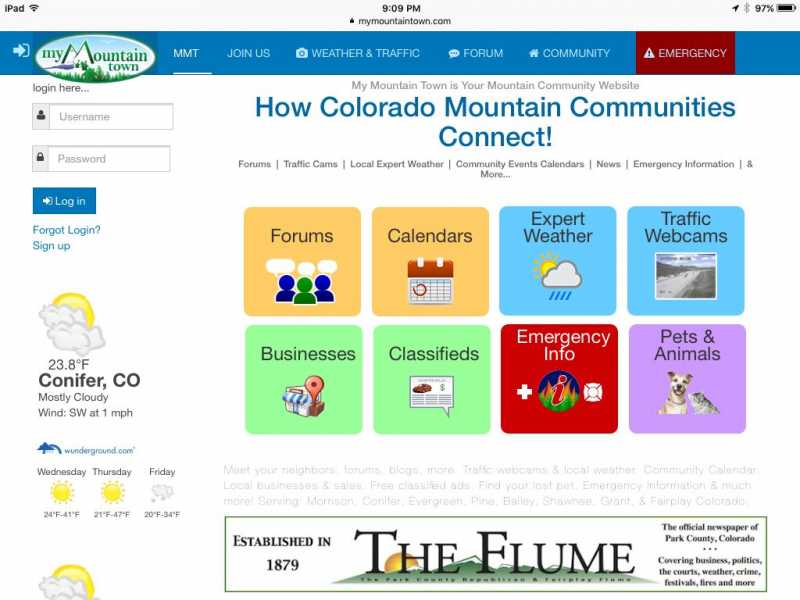
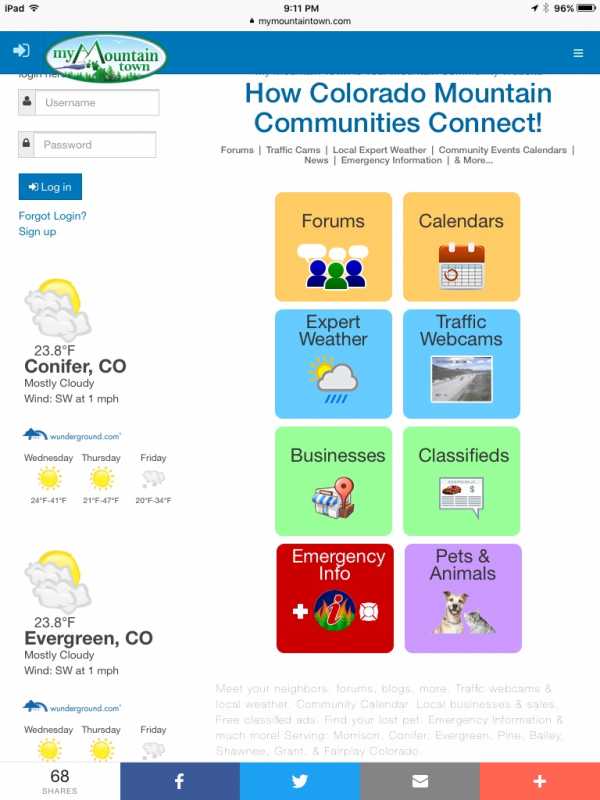
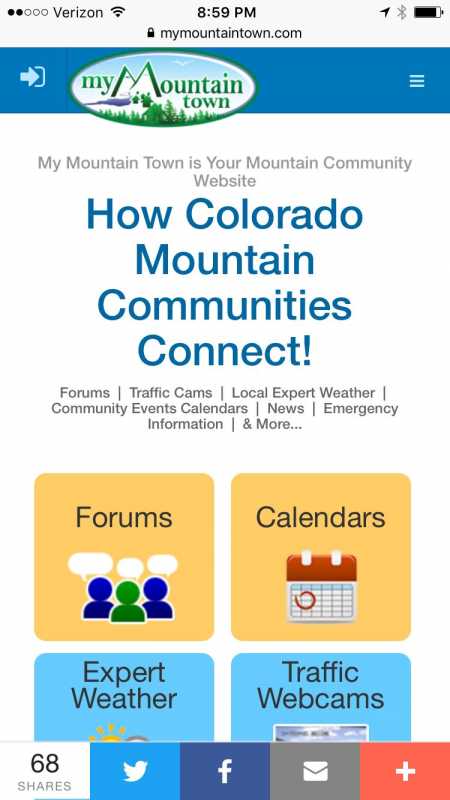
Whoo-hoo! Aside from a few minor things to clean up, our website upgrade is finally done! My Mountain Town is now a fully mobile-responsive website: if you're on a desktop or laptop, go to the Home Page (or the forum pages, if you'd like to see what it does to those) and at the bottom right-hand corner, grab it with your mouse (click and hold down) when you see the arrow pointing inward/outward, and drag it across your screen to the left - you'll see how it automatically changes based on the size of the screen (you can see examples at the bottom of the post). You're emulating being on a tablet at about halfway across and a mobile phone when you can only see the 3 bars at the top right-hand corner that is the drop-down top bar menu.
We'll start updating our FAQ Forum , sharing new features, how to use them, and things you can do with it!
This is all part of our effort to continue to improve and grow, and make using the website a better experience for you. We welcome feedback, both positive and constructive criticism, because mymountaintown.com/ is YOUR Community website! Please let us know if something isn't working right, if we can make something easier to use, features we don't have that you would like to have incorporated, and what you think of what's available!
First up is our Home Page, with redesigned buttons to take you to your most-wanted pages:
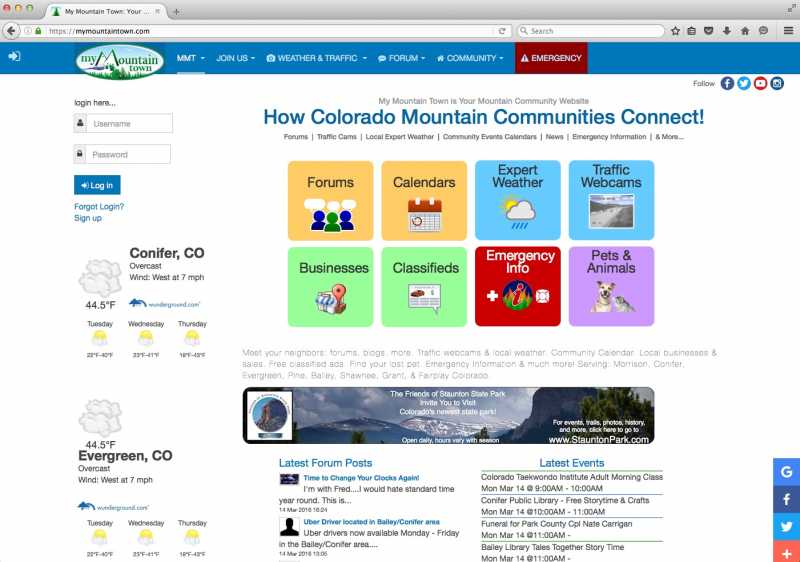
Forums (or you can scroll a little lower and go right to our most Recent Topics )
Community Event Calendar
Expert Mountain Weather Forecasts by Chief Meteorologist Steve Hamilton
Upgraded Highway & Scenic Webcam Pages - Hwy 285 Morrison to Kenosha Pass , Kenosha Pass to South Park , I-70/Hwy 73/74 Golden to Evergreen , and Evergreen to the Eisenhower Tunnel - you won't find a more comprehensive page with all of the webcams you want to see most on your commute to and from home! Not even CDOT has all of these!
Business & Nonprofit Directory - now searchable by category as mentioned in the previous post!
Mountain Classifieds (majorly upgraded!!)
Emergency Info (we overhauled this one pretty significantly too)
and Pets & Animals
Just underneath are our Diamond Level advertisers banner ads and off to the side are our Platinum Level advertisers - these folks make it possible for us to keep doing what we do with their support, so please patronize them and tell them you saw them on My Mountain Town! We appreciate that more than we can say! You can also tell our advertisers by the ones on the first pages of our Directory who have logos and filled out Profile Pages. The pages are in alphabetical order, but separated first by our paid advertisers, then free listings.
Still showing are our most Recent Forum Posts (copied over from the forums as soon as they are posted) and upcoming Events pulled from our Community Event Calendar so you can see in a quick glance what's happening today and tomorrow.
Below that is our Twitter feed, so even if you aren't on Twitter yourself, you can see the latest info that we share there; very important for breaking emergency info from other sources such as our Jefferson County Sheriff's Office, area fire departments, and other local news media. Plus, we have fun sharing beautiful pictures, additional info from our advertisers, and fun conversations with other Twitter users!
At the bottom, you'll see we're proud members of the Conifer Area Chamber of Commerce, Evergreen Chamber of Commerce, Platte Canyon Area Chamber of Commerce, and South Park Chamber of Commerce-Fairplay, CO. We encourage everyone to support our fellow Chamber members!
My Mountain Town Home Page Horizontal Tablet View:
My Mountain Town Vertical Tablet View:
My Mountain Town Mobile Phone View:
#ShopLocal #MMTwx
We'll start updating our FAQ Forum , sharing new features, how to use them, and things you can do with it!
This is all part of our effort to continue to improve and grow, and make using the website a better experience for you. We welcome feedback, both positive and constructive criticism, because mymountaintown.com/ is YOUR Community website! Please let us know if something isn't working right, if we can make something easier to use, features we don't have that you would like to have incorporated, and what you think of what's available!
First up is our Home Page, with redesigned buttons to take you to your most-wanted pages:
Forums (or you can scroll a little lower and go right to our most Recent Topics )
Community Event Calendar
Expert Mountain Weather Forecasts by Chief Meteorologist Steve Hamilton
Upgraded Highway & Scenic Webcam Pages - Hwy 285 Morrison to Kenosha Pass , Kenosha Pass to South Park , I-70/Hwy 73/74 Golden to Evergreen , and Evergreen to the Eisenhower Tunnel - you won't find a more comprehensive page with all of the webcams you want to see most on your commute to and from home! Not even CDOT has all of these!
Business & Nonprofit Directory - now searchable by category as mentioned in the previous post!
Mountain Classifieds (majorly upgraded!!)
Emergency Info (we overhauled this one pretty significantly too)
and Pets & Animals
Just underneath are our Diamond Level advertisers banner ads and off to the side are our Platinum Level advertisers - these folks make it possible for us to keep doing what we do with their support, so please patronize them and tell them you saw them on My Mountain Town! We appreciate that more than we can say! You can also tell our advertisers by the ones on the first pages of our Directory who have logos and filled out Profile Pages. The pages are in alphabetical order, but separated first by our paid advertisers, then free listings.
Still showing are our most Recent Forum Posts (copied over from the forums as soon as they are posted) and upcoming Events pulled from our Community Event Calendar so you can see in a quick glance what's happening today and tomorrow.
Below that is our Twitter feed, so even if you aren't on Twitter yourself, you can see the latest info that we share there; very important for breaking emergency info from other sources such as our Jefferson County Sheriff's Office, area fire departments, and other local news media. Plus, we have fun sharing beautiful pictures, additional info from our advertisers, and fun conversations with other Twitter users!
At the bottom, you'll see we're proud members of the Conifer Area Chamber of Commerce, Evergreen Chamber of Commerce, Platte Canyon Area Chamber of Commerce, and South Park Chamber of Commerce-Fairplay, CO. We encourage everyone to support our fellow Chamber members!
My Mountain Town Home Page Horizontal Tablet View:
My Mountain Town Vertical Tablet View:
My Mountain Town Mobile Phone View:
#ShopLocal #MMTwx
Last edit: 18 Mar 2016 13:12 by MyMountainTown. Reason: added photos
Please Log in or Create an account to join the conversation.
Time to create page: 0.212 seconds
sponsors